- Open Commandline Manager.
- Open Custom Commandlines.
- Click + New.
- Enter a description, enable the map selection, and select the required map.
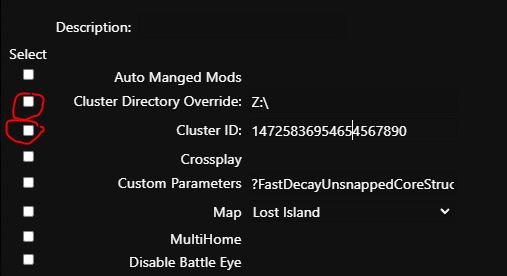
- Enable Cluster Directory Override and enter Z:\ in the field.
Enable Cluster ID and enter any identifier, for example: 1472585466567890. - Click Save and then Select.
- Open Configuration Files and click Text Editor for GameUserSettings.ini.
- Set the following values according to your requirements. All options are disabled by default; change True to False to allow the corresponding download.
- PreventDownloadDinos=False
PreventDownloadItems=False
PreventDownloadSurvivors=False
Apply the same settings, including the same Cluster ID, to all other servers in the cluster.
More information about command lines is available at https://pay.czechchillout.cz/index.php/knowledgebase/44/3-commandline-manager.html.