- Open Commandline Manager.
- Select the Custom Commandlines tab.
- Click + New.
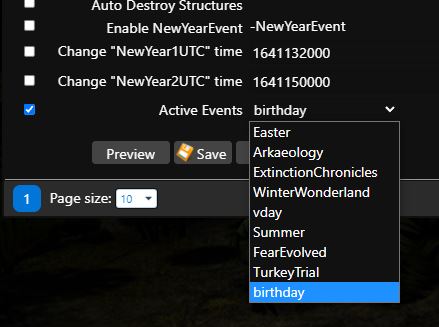
- Configure the required options. At the bottom, enable Active Events and select the event from the drop-down list.
- Click Save.
- Click Select.
- Start the server.
More information about events is available at https://ark.wiki.gg/wiki/Events.
NewYearEvent is the only exception. Configure it in the same way, but enable Enable NewYearEvent instead of Active Events.
To change the start times for NewYearEvent, also enable Change NewYear1UTC time and Change NewYear2UTC time. You can convert the required time at https://www.epochconverter.com/.