
To change the DayZ RCON settings, follow these steps:
- Stop the server.
- Open File Manager.
- In the battleye folder, delete BEServer_x64_active_XXXXX.cfg.
- Open Configuration Files from the main menu.
- Click Text Editor for BEServer_x64.cfg.
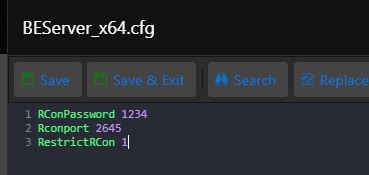
- Enter the required settings:
- RConPassword 1234 — replace 1234 with your password.
- Rconport XXXX — leave the existing port unchanged.
- RestrictRCon 0 — 0 enables RCON; 1 disables it.
- The result should match the image below.
- Start the server.
Repeat this process after every change. DayZ creates an active configuration file, which must be deleted before new settings can be applied.
