DayZ /// Automatic modification/game update settings

To set up automatic updates for workshop or game modifications, follow the instructions below

  1. Shut down the server
  2. Click on "Scheduled Tasks" in the main menu
  3. +New
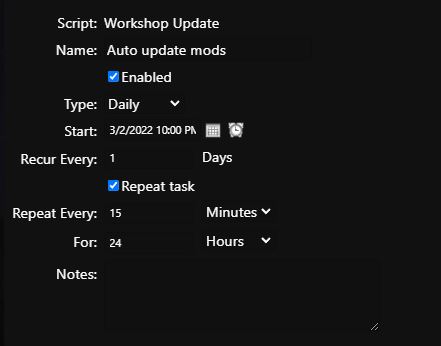
  4. Select "Workshop Update" (to check for modification updates) or "Steam Update" (to check and update the game itself)
  5. Then set "Name" type to "Daily", start will be the first run, Recur Every will be set to 1 day
  6. Next, check "Repeat task" and "Repeat Every" (interval how often to check for new version modifications); set "For" to 24 hours, so that the check runs until the next start of the whole task
  7. In the top panel click on "Advanced Options", here you can leave the default values, i.e. immediate start.
  8. Save

Now if the modification/server update is available, there will be a 10 minute countdown (10,9,8,7,6, 5,4,3,2,1m,30sec) which will run until the global chat in game and then the server will restart and perform the update.

To later view the log of what modification was updated, just click on "Log Manager/Log Manager" and open the log "workshop-updates.log"

02/03/2022 19:33:28.65 updated 2765944669 GAZ 66 SHISHIGA



  • DayZ automatické aktualizace, dayz automatic updates
  • 1 Users Found This Useful
Was this answer helpful?

Related Articles

DayZ /// Turning off the FPS limit

We try not to spoil our customers, so it's up to you to turn off the FPS limit, but in any case...

DayZ /// DZSALauncher

DZSA Launcher does not need to be installed, it is already installed on the server by default If...

DayZ /// How to enable RCON and change password

Changing the RCON settings is a bit more complicated with DayZ, but you can definitely do it by...

DayZ /// How to install server modifications

Shut down the server Click on "Command Line Manager" in the main menu Select the tab at the...

DayZ /// Server not starting

If the server does not want to start for some reason, for example PID0 is displayed or you do not...