
To configure automatic Workshop mod or game updates, follow these steps:
- Stop the server.
- Open Scheduled Tasks from the main menu.
- Click + New.
- Select Workshop Update to check for mod updates or Steam Update to check and update the game server.
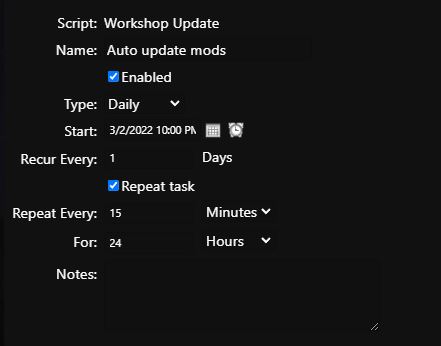
- Enter a name, select Daily, set the initial start time, and set Recur Every to 1 day.
- Enable Repeat task. Set Repeat Every to the required update-check interval and For to 24 hours so that checks continue until the next daily task starts.
- Open Advanced Options. You can retain the default settings, including immediate execution.
- Save the task.
When a mod or game update is available, the server displays a ten-minute in-game countdown and then restarts to install the update.
To review which modifications were updated, open Log Manager and view workshop-updates.log.
Example: 02/03/2022 19:33:28.65 updated 2765944669 GAZ 66 SHISHIGA
