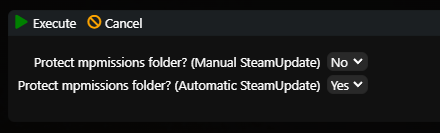
Use the following feature to prevent updates from overwriting custom settings in the mpmissions directory, such as types and loot configuration.
Important: When protection is active, the entire mpmissions directory is excluded from updates. Changes to maps or mission files released by the game developers will therefore not be applied automatically.
- Log in to the server management panel.
- Click More next to the Start and Stop buttons.
- Click Protect mpmissions folder.
- Select when protection should be used:
- Manual Steam Update — when you click the Steam Update button manually.
- Automatic Steam Update — when scheduled automatic updates run.
- Click Execute.
For a manual Steam Update, the task window shows whether directory protection is active and whether the protected content was restored after the update.