
7 Days to Die /// How to turn off Easy Anti-Cheat (EAC)

  1. Open the configuration files
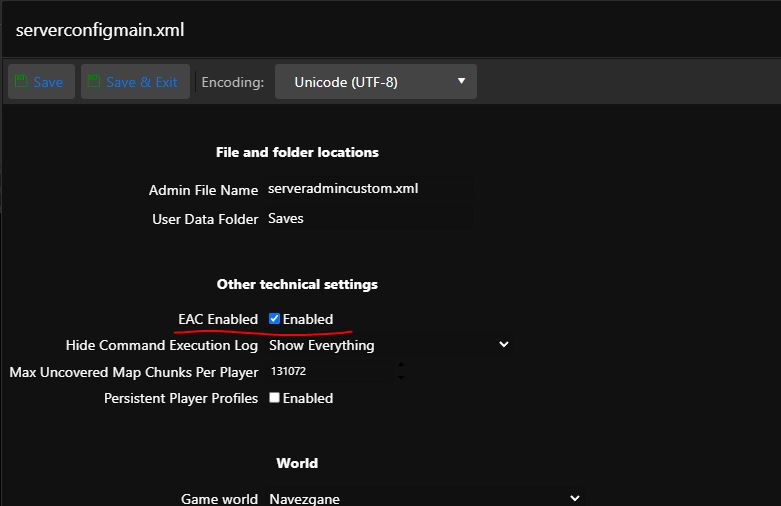
  2. Edit the serverconfigmain.xml file using the Configuration Editor or Text Editor
  3. In the case of the Text Editor, you will find the line <property name="EACEnabled" value="true"/> <!-- Enables/Disables EasyAntiCheat -->
  4. In the case of the Configuration Editor, see image below
  • 7days to die eac, anticheat, easy anticheat
  • 0 Users Found This Useful
Was this answer helpful?

Related Articles

How do I add administrator rights

To add yourself as an admin within the game follow this guide Log into the game panel, select...

7 Days to Die /// Darkness Falls and Undead Legacy

We have both of these modes pre-built, including the ability to update them. Shut down the...

7 Days to Die /// uMOD and Custom Mod Manager

You can also use third-party add-ons on the server that don't come from Steam Workshop. One such...

7 Days to Die /// WebMap

In case you want to have WebMap on your server, you need to install Alloc's server fixes Click...

7 Days to Die /// How to enable RCON (Telnet)

In default, RCON(Telnet) is enabled, you can only change a passsword. You can find the connection...
