- Klikněte na "Správce přikazové řádky/Commandline Manager"
- Vyberte kartu "Vlastní příkazové řádky/Custom Commandlines"
- +Nová/New
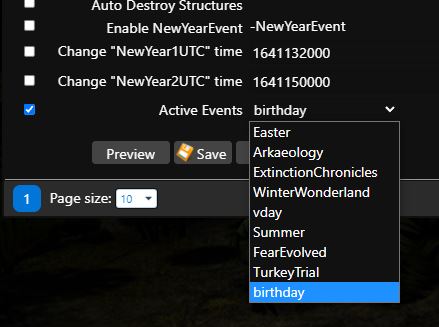
- Vyplňte vše potřebné a v dolní části naleznete řádek "Active Events" a v roletce vyberete jaký event chcete aktivovat
- Kliknete na "Uložit/Save"
- Kliknete na "Vybrat/Select"
- Spustíte Server
Více informací o eventech najdete zde: https://ark.fandom.com/wiki/Events
Jediná výjimka je "NewYearEvent", ten zapnete podobným způsobem, jen nevyberete "Active Events" ale "Enable NewYearEvent"
V případě, že chcete změnit čas, kdy NewYearEvent začíná, je potřeba zakliknout i další dva řádky "Change NewYear1UTC time" a "Change NewYear2UTC time". Jak vyplnit hodnotu odpovídající požadovanému času najdete zde: https://www.epochconverter.com/