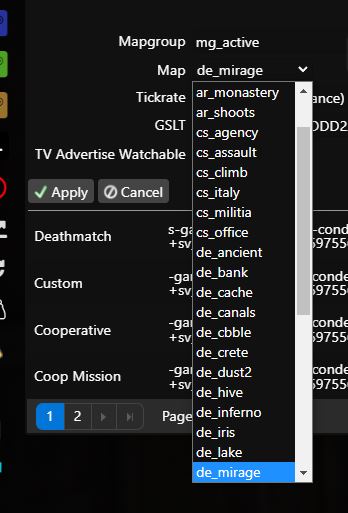
CS:GO /// Change default map

  1. Click on "Commandline Manager" in the main menu
  2. For the line that indicates the GameType you currently want to play, click on "Select" (If it is already selected, click on "Selected"
  3. In the "Map" line, select the map that will be the default map when the server starts

  • cs:go změna mapy, cs:go mapa
  • 0 Users Found This Useful
Was this answer helpful?

Related Articles

CS:GO /// Change GameType (Demolition/Competitive etc..)

Click on "Commandline Manager" in the main menu For the line that indicates the GameType you...

CS:GO /// Starting the server for the first time, creating a GSLT token

Due to a recent update to CS:GO, clients must provide a steam account token to the leased game...

CS:GO /// How do I change TickRate

Shut down the server Click on "Command Line/Commandline Manager" in the main menu At the line...

CS:GO /// Metamod:Source, SourceMod, WarMod

All these modifications (Metamod:Source, SourceMod, WarMod) can be installed with one click....

CS:GO /// FastDownload Sync

In case your server is not pure vanilla and you have some modifications, plugins etc.. you will...