CS:GO /// SourceMod: Add Administrator

After installing Source mode you need to add an administrator, follow the instructions below

  1. Shut down the server
  2. Click on "Configuration Files"
  3. For the "admins_simple.ini" file, click on the "Text editor" button
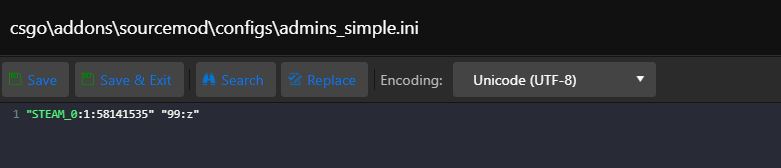
  4. Then enter the SteamID and rights in this format "STEAM_0:1:58141852" "99:z" (99:z) indicates the highest rights
  5. You can read more here: https://wiki.alliedmods.net/Adding_Admins_(SourceMod)
  6. Start the server


  • cs:go sourcemod
  • 0 Users Found This Useful
Was this answer helpful?

Related Articles

CS:GO /// Change default map

Click on "Commandline Manager" in the main menu For the line that indicates the GameType you...

CS:GO /// Change GameType (Demolition/Competitive etc..)

Click on "Commandline Manager" in the main menu For the line that indicates the GameType you...

CS:GO /// Starting the server for the first time, creating a GSLT token

Due to a recent update to CS:GO, clients must provide a steam account token to the leased game...

CS:GO /// How do I change TickRate

Shut down the server Click on "Command Line/Commandline Manager" in the main menu At the line...

CS:GO /// Metamod:Source, SourceMod, WarMod

All these modifications (Metamod:Source, SourceMod, WarMod) can be installed with one click....