
Hra Rust má globální wipe day a to každé první úterý v měsíci.
U nás se o to starat nemusíte, máme připravený script, pomocí kterého se provede wipe, update a navíc si můžete nastavit, co přesně chcete vynechat, popřípadě si dopředu naplánovat plán dalších seedů mapy. To vše přesně v den, kdy je wipe day.
Níže Vám popíšeme, jak úlohu správně nastavíte
- V hlavním menu klikněte na "Plánovač úloh"
- Vyberte úlohu s názvem "Wipe on Rust Wipe Day"
- Nastavte úlohu, tak aby se spouštěla každý den v libovolný čas (úloha musí běžet každý den, aby si překontrolovala, zdali je WipeDay nebo není. Nemusíte se bát, pokud není wipeday, úloha nic nedělá)
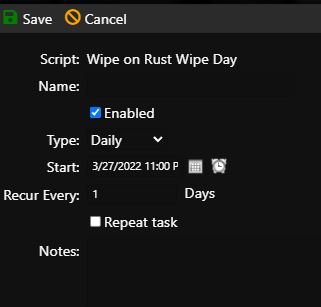
- Dále v kartě nahoře uvidíte možnost "Script Parameters"
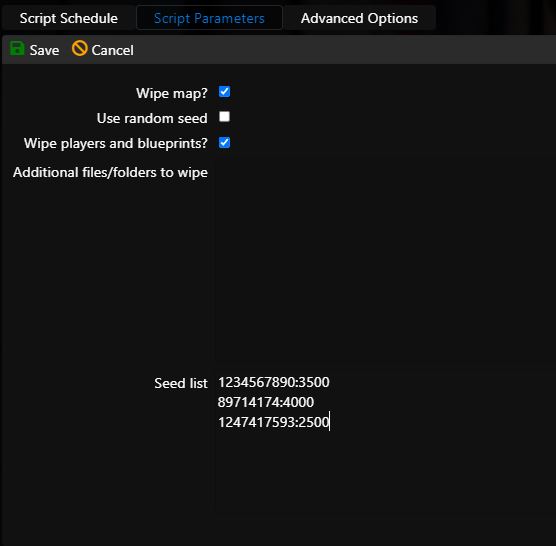
- Zde nastavíte detaily k provedení wipu. V našem případě chceme realizovat wipe mapy, wipe hráčů a jejich blueprintů a nechceme použít random seed. Seznam seedů, které chceme použít v následujících wipech napíšeme do Seed listu, systém je bude brát v uvedeném pořadí, každý měsíc.
- Seed zapisujeme ve formátu SEED:SIZE, například tedy 1234567890:3500
- V kartě Rozšířených možností necháme okamžité spuštění
- Klikneme na Save
