
Terraria // Resizing the World

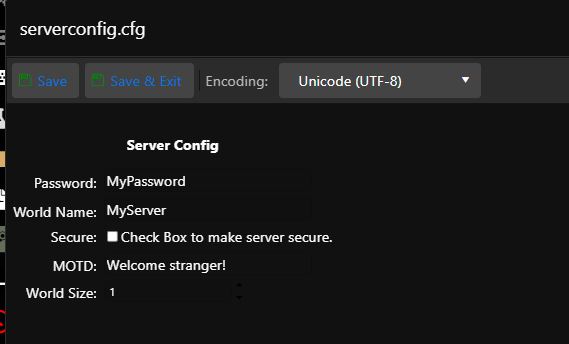
Terraria has default 3 sizes of saints, 1(small), 2(medium), and 3(large).
You can change it by the following procedure

1. Shut down the server

2. Open the server back up

3. Click on Configuration Files

4. For the file "serverconfig.cfg" click on the button "Configuration Editor
5. In the "World Site" field, enter the number of the specified size

6. Click on "Save and exit"

7. Start the server
  • terraria world size, terraria změna velikosti světa
  • 0 Users Found This Useful
Was this answer helpful?

Related Articles

Terraria /// How do I set a server password

1. Shut down the server 2. Open the server back up 3. Click on Configuration Files 4. For...

Terraria /// How do I change the world/server name

1. Shut down the server 2. Open the server back up 3. Click on Configuration Files 4. For the...

Terraria /// Turning anticheat on and off

1. Shut down the server 2. Open the server administration 3. Click on Configuration Files 4....

Terraria /// tModLoader; TShock

We support extensions that allow you to better use your server You can install all these...
