
ARK Survival Evolved /// How do I change the map

  1. Click Commandline Manager/Commandline Manager

  2. In the predefined, click the "Select" button next to the command line selection 

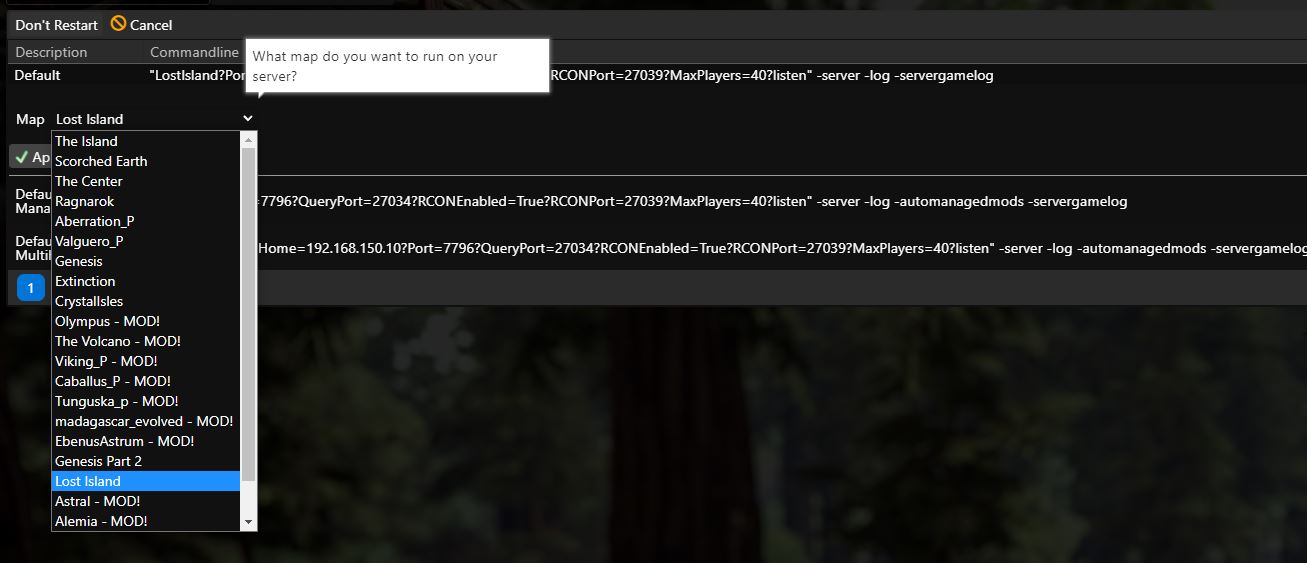
  3. Select the map

  4. Click on Apply/Apply

If you are using a custom command line the procedure is similar, just select the map box, select and save

If you would like to enter a modded map that is not already in the menu, please create a ticket, we will add the map

More about commandline manager you can find here: https://pay.czechchillout.cz/index.php/knowledgebase/44/3-commandline-manager.html 
  • ark survival evolved změna mapy, ark survival evolved map change
  • 0 Users Found This Useful
Was this answer helpful?

Related Articles

ARK Survival Evolved /// Adding an administrator

How to add administator Go to http://steamid.co/ and copy the link to the steam profile URL...

ARK Survival Evolved /// Automatic modification updates

You have multiple solutions for automatically updating modifications. A) By selecting the...

ARK Survival Evolved /// Crossplay Epic Games

Click on Commandline Manager Select the Custom Commandlines tab at the top Click on "+New"...

ARK Survival Evolved /// How to configure incubation/adulting/imprinting settings

First, we will explain all configuration options related to incubation / maturation / imprinting...

ARK Survival Evolved /// How to use Whitelist (ExclusiveJoin)

The ExclusiveJoin feature is used to prevent players from accessing the server, or to allow...
