
RUST /// How do I Wipe the server

In case you want to implement a Server Wipe, click on the "Wipe Server" button.

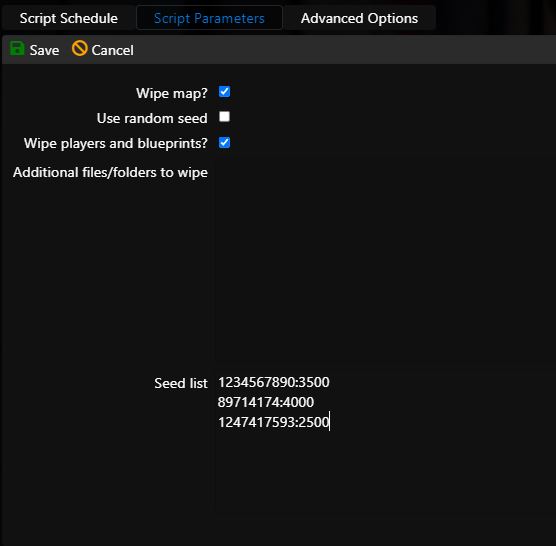
  1. Here you can set the details to perform the wipe. In our case we want to wipe the map, wipe players and their blueprints and we don't want to use random seed. The list of seeds that we want to use in the following wipes will be written in the Seed list, the system will take them in the order indicated, every month. (The list is written only in case of automatic wipes, for one-time wipes write only one seed)
  2. Seed is written in the format SEED:SIZE, for example 1234567890:3500
  • rust wipe, rust provedeni wipu, rust smazání, rust vymazání
  • 0 Users Found This Useful
Was this answer helpful?

Related Articles

RUST /// uMOD; Discord extension

You can also use third-party add-ons on the server that don't come from Steam Workshop. One such...

RUST /// Automatic Wipe settings

Rust has a global wipe day on the first Tuesday of every month. You don't have to worry about it...

RUST /// Switch to Staging (Beta version of the game)

The developers of Rust are allowing you to test the game's day-to-day workings ahead of its...

RUST /// How do I add an administrator

To add an administrator or moderator, you have two options The first option is implemented when...

RUST /// How to add a custom map to the server

In order to add your own map to the server, you must first upload it to some hosting that allows...
