
Přípravili jsme pro Vás funkci, která Vám umožní si nechávat zasílat notifikace na discord. Funkce je určená pro aktualizace nainstalovaných modifikací na serveru (SteamWorkshop installed) funguje jak v případě manuální aktualizace tak v případě, že máte nastavené automatické aktualizace modifikací, viz článek https://pay.czechchillout.cz/index.php/knowledgebase/192/dayz-nastaveni-automaticke-aktualizace-modifikacihry.html
- Předpokládáme, že máte již automatické aktualizace nastavené dle uvedeného článku
- Otevřete si správu serveru
- Kliknete na tlačítko "More/Více" (vedle tlačítka Start/Stop)
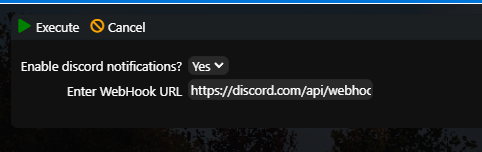
- V menu kliknete na položku "Discord notifications"
- Zde pro povolení vyberete "Yes" a vložíte webhook kanálu na Vašem discord serveru, pokud nevíte jak WebHook získáte, tak je to uvedeno níže.
- Kliknete na Execute
Nyní v případě, že bude publikována aktualizace nějaké modifikace, kterou máte na serveru bude odeslána notifikace na Váš discord. To jak často kontrola probíhá nastavujete pomocí naplánované úlohy pro automatické modifikace.
Notifikace na discord proběhne vždy až dojde k aktualizaci na serveru! Ať už automatické nebo manuální
Jak získám WebHook?
- Otevřete si Váš discord server
- Kliknete pravým tlačítkem na textovou místnost, kam chcete notifikace zasílat
- Upravit kanál
- Propojení
- Notifikační služby (Webhooks)
- Nový Webhook
- Vytvoří se Vám nový webhook a na něj kliknete
- Kliknete na tlačítko Kopírovat URL webhooku
- Vložíte a použíteje v návodu nahoře
