-
Click Commandline Manager/Commandline Manager
-
Custom Commandlines/Custom Commandlines
-
+New
-
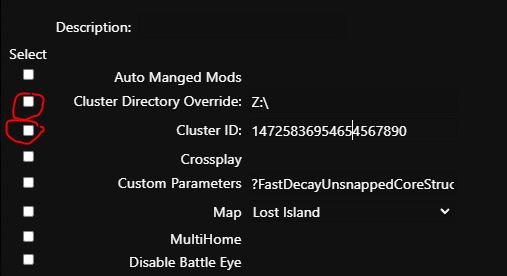
Enter a description, check the map selection and select it
-
Then check Cluster Directory Override and type "Z:\" without quotes in the box
Check "Cluster ID" and type any number in the field, for example: 1472585466567890 -
Click Save/Save and then click Select/Select
-
Open the configuration file and click on Text Editor next to GameUserSettings.ini
-
Set the following values according to your requirements, by default everything is disabled, to enable override True to False
-
PreventDownloadDinos=False
PreventDownloadItems=False
PreventDownloadSurvivors=False
Apply the same settings to the other servers including the same Cluster ID
More about the command line can be found here:
https://pay.czechchillout.cz/index.php/knowledgebase/44/3-commandline-manager.html