
ARK Survival Evolved /// ZeroDay bug and subsequent fix

The ZeroDay bug is a problem where your saved world is reset by itself after a server update or restart.

The fix is quite simple

  1. Shut down the server
  2. Click on FileManager
  3. Click through the folder structure to ShooterGame/Saved/SavedArks
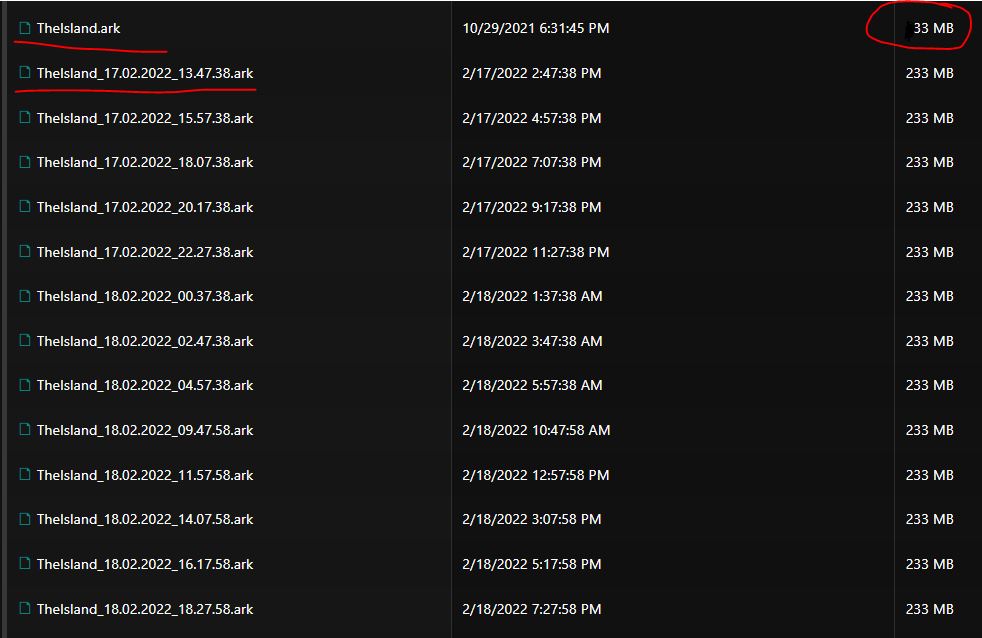
  4. Find the saved map files "Mapname.ark" and "Mapname_date_time.ark"
  5. Note that the files will have very different sizes, the ones that are corrupted are smaller in size
  6. The file that ARK reads as active is always the one without the date
  7. Rename this file
  8. Then find the file with the most recent date that still has the correct (larger) size
  9. Rename this file to the original file name without the date, i.e. "MapName.ark"
  10. Start the server and double check that the server is restored
  • ark survival evolved zeroday
  • 0 Users Found This Useful
Was this answer helpful?

Related Articles

ARK Survival Evolved /// Adding an administrator

How to add administator Go to http://steamid.co/ and copy the link to the steam profile URL...

ARK Survival Evolved /// Automatic modification updates

You have multiple solutions for automatically updating modifications. A) By selecting the...

ARK Survival Evolved /// Crossplay Epic Games

Click on Commandline Manager Select the Custom Commandlines tab at the top Click on "+New"...

ARK Survival Evolved /// How do I change the map

Click Commandline Manager/Commandline Manager In the predefined, click the "Select"...

ARK Survival Evolved /// How to configure incubation/adulting/imprinting settings

First, we will explain all configuration options related to incubation / maturation / imprinting...
