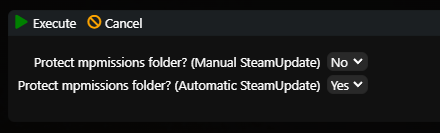
If you want to make sure that each update doesn't delete the Types, Loot, etc. settings, then follow this guide.
Please note that if this feature is active, the entire contents of the mpmissions directory will not be updated. Therefore, if the game developers make any changes to the maps, the Väm map will not be updated.
1. Login to Server management
2. Click on the More/Vice button (located next to the Start/Stop button)
3. Click on "Protect mpmissions folder" in the following menu
4. Now choose in which situations you want to protect the folder
1. Manual SteamUpdate - Simply click on the SteamUpdate button in the menu
2. Automatic SteamUpdate - Applied when you have set automatic updates in the Filled Windows.
5. Click on "Execute"
You have set up, in the case of manual SteamUpdate you can see in the window whether the address protection is active and whether the recovery after the update has been done in the background.